


VidoSave: Video Downloader
0.00.00 Reviews
App Specs
- Version
- 1.0.0
- Updated On
- License
- Free
- Downloads
- 500,000+
- Developer
- Kaizo Innovation
- Categories
- Video Players & Editors
- Platform
- Android
Screenshots
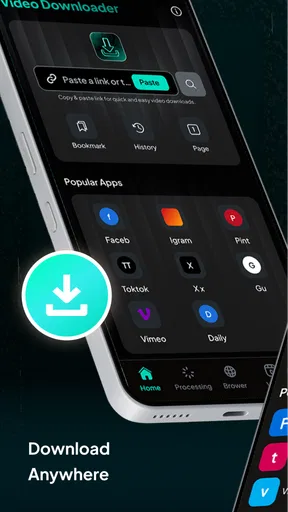
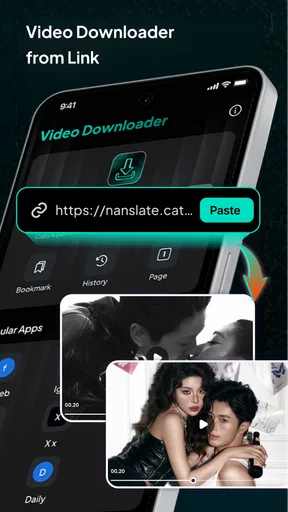
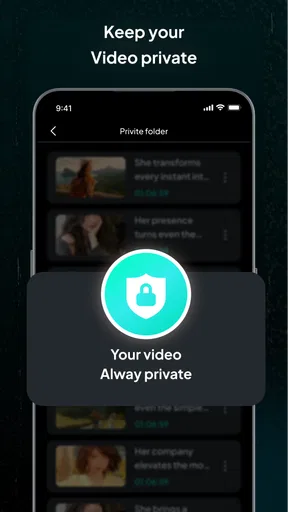
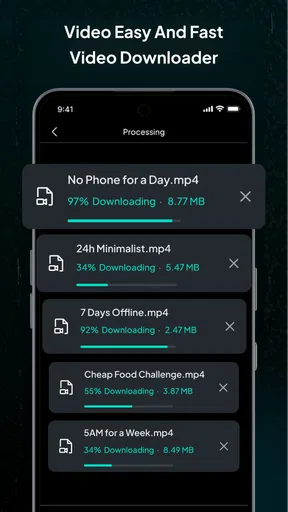
 Analysis by AppCompare
When I need a video to be available offline, the useful question is not just whether a downloader can save it, but whether the process fits into the moment when I need it. VidoSave: Video Downloader is built around that practical job: saving video for later, including higher-resolution material. That makes it most interesting to people who want to prepare clips before a commute, a trip, or a stretch of time without reliable internet.
The appeal of saving video for later
Offline viewing changes how I use a video. A tutorial can stay handy while I work through a task, and a clip I want to show someone does not have to depend on a strong connection at the time. The convenience is real, but it depends on being able to save the particular video in the first place and having enough room on the phone to keep it.
VidoSave is a free video-player and editing-category app from Kaizo Innovation. Its current version is 1.0.0, and it is listed for devices running Android 8.1 or later. The app is rated for Everyone, has passed 500K installs, and currently has a 0.0 average rating. That last figure gives me little user-rating context, so I would treat the app as something to assess for my own workflow rather than assume its popularity means it will suit me.
What the high-resolution promise means in everyday use
The central draw is the option to save video with a focus on HD and 4K. Higher resolution can make a clip look clearer on a larger screen, but it is not automatically the right choice for every download. A short video watched on a phone may not benefit enough to justify keeping a larger file, while a detailed demonstration may be easier to follow when the image is sharper.
I would choose quality according to the job: use a more modest option when I just need a clip for reference, and reserve the best available quality for material where fine detail matters. This is also a sensible way to manage storage. If I am saving several videos for one trip, checking the device’s free space first is more useful than selecting the highest resolution by habit.
A practical routine before going offline
For a realistic use case, imagine I have a long train ride coming up and want a few instructional clips ready. I would save them while I still have a dependable connection, then check that the files appear on the device and open before leaving. That small final check matters: a completed download is only useful if I can find and play it when the network is unavailable.
I would also keep downloads organized around their purpose. A handful of clips for a repair, a recipe, or a lesson is easier to manage than a growing pile of unnamed videos. Before saving, I would consider whether I need the whole video or only want to revisit it online later. Keeping only genuinely useful files avoids turning an offline convenience into a storage cleanup chore.
Worth Reading Before You Choose

EA SPORTS FC Mobile 26 Is a Bigger Football Game, but It Takes Time

Flipboard Shows What News Apps Must Do Beyond the Feed

Switching to Android Auto Means Rethinking Your Driving Routine

Google Calendar Makes a Crowded Week Easier to Manage

Ludo King Makes the Most of the Minutes Between Plans

Baby Panda World Brings Quick Play to Modern Phones, but Its Game Library Feels Busy
How it fits beside other ways to watch
VidoSave belongs to the same broad family as video-saving utilities, but it serves a different need from a regular streaming app. Streaming is usually the simpler choice when I have a stable connection and want to browse or watch without managing local files. A downloader is more useful when I need a video to remain accessible offline, provided saving that material is allowed.
Compared with simply bookmarking a clip, a saved file can be more dependable in places with poor reception. The trade-off is responsibility: I have to make sure the file is accessible, manage storage, and respect the creator’s rights and the platform’s rules. I would only download videos I am entitled to keep, and I would not assume that every site or clip can be saved just because an app is designed for downloading.
For a one-off video, the usual app or browser may be enough. For someone who repeatedly prepares material for offline use, a dedicated downloader can be more convenient. The best choice depends less on the broad promise of 4K and more on whether the videos I actually use can be saved in a format and quality that work for my device.
Where I would be cautious
High-resolution files can take up more space, so saving everything at the best quality may be a poor fit for a phone with limited room. I would be selective and delete clips once I no longer need them. I would also check the result before relying on it: playback quality, file size, and whether the video is available offline are practical details that matter more than a headline feature.
There is also a permissions and trust question with any downloader. I would review what the app asks to access during setup and avoid granting permissions that do not seem relevant to the task. I would not treat privacy or security as guaranteed simply because an app is focused on downloads; basic caution with files and device access is worthwhile.
The app is free to install, with in-app purchases ranging from $2.99 to $29.99 per item. I would check what an optional purchase unlocks before paying and decide whether it solves a real need in my routine. If I only want to save an occasional clip, I would first see whether the free experience is sufficient rather than buying something on the assumption that it is required.
Who is likely to get the most from it?
I see the clearest fit for people who often need reference videos away from Wi-Fi: travelers, students reviewing visual lessons, or anyone following a demonstration in a location where reception is unreliable. It is also a reasonable option for someone who values having a clip stored locally instead of searching for it again each time.
I would skip it if I mainly watch through streaming services, rarely leave a reliable connection, or do not want to manage downloaded files. It is also not the right answer for someone who expects every online video to be downloadable or wants a downloader to replace a full media library. In those cases, streaming, bookmarking, or an official offline-viewing option may be more straightforward.
Overall, the deciding question is simple: do I regularly need specific videos available without a connection? If the answer is yes, the focus on saving HD and 4K material gives VidoSave: Video Downloader a clear purpose worth trying. If offline access is only an occasional thought, I would stick with the viewing tools I already use and avoid adding another app to manage.
Why VidoSave is a Must-Have
VidoSave stands out in the crowded world of video downloaders. It’s not just another app cluttering your phone; it’s a tool that actually delivers on its promise. With a user-friendly interface and a plethora of features, it’s hard not to be impressed.
Unpacking the Features
Let’s talk features. The app supports a wide range of platforms, from social media giants to niche video hosting sites. This versatility means you can grab your favorite clips from almost anywhere.
- Easy Downloads: Just a few taps and your video is ready to go. No need for complicated processes or endless ads.
- Multiple Formats: Whether you need MP4, AVI, or something else, VidoSave has you covered.
- Batch Download: Got a playlist you want to save? Download multiple videos simultaneously without breaking a sweat.
The icing on the cake is the built-in browser. This feature lets you search for videos directly within the app, making the process seamless. No more jumping between apps or copying URLs.
Performance and Usability
Performance-wise, VidoSave is solid. Videos download quickly, and the app doesn’t hog your device’s resources. Even with multiple downloads running, the app remains responsive. This is a big win for those of us who are impatient and want our videos now.
The interface is clean and intuitive. You don’t need to be tech-savvy to navigate through the app. Everything is laid out clearly, and the learning curve is practically non-existent.
Privacy and Security
In today’s digital age, privacy is a big concern, and rightfully so. VidoSave takes this seriously. The app doesn’t require unnecessary permissions, and it ensures your data remains secure. It’s always reassuring to know that your downloads are private and safe from prying eyes.
Customer Support and Updates
The developers behind VidoSave seem committed to their product. Regular updates keep the app running smoothly, and any bugs are swiftly addressed. Plus, their customer support is responsive, making it easy to get help when you need it.
Final Thoughts
So, what’s the verdict? If you’re in the market for a reliable and efficient video downloader, powerful features with ease of use make it a standout choice in the app world. Whether you’re saving tutorials for offline viewing or just keeping your favorite memes close at hand, this app has got you covered.
Ready to give it a try? You can download the app and see for yourself what all the fuss is about. Happy downloading!
Pros
- Easy-to-use interface for quick navigation.
- Supports downloading from multiple platforms.
- High-quality video downloads available.
- No signup required for basic features.
- Fast download speeds for large files.
Cons
- Contains ads that can be intrusive.
- Limited format options for downloaded videos.
- Some features require in-app purchases.
- Occasional bugs may disrupt downloads.
- Not available on all app stores.
FAQs for VidoSave: Video Downloader
What is VidoSave: Video Downloader, and how does it work?
VidoSave: Video Downloader is a versatile app that enables users to download videos from various platforms directly to their devices. It supports multiple video formats and resolutions, ensuring compatibility with most devices. Simply paste the video URL into the app's interface, select your desired format, and click download to save it for offline viewing.
Is VidoSave: Video Downloader free to use, or are there any in-app purchases?
VidoSave: Video Downloader is free to download and use, but it may offer in-app purchases to unlock premium features such as ad-free browsing, higher download speeds, or additional video formats. Users can enjoy the basic functionalities without payment, but premium options enhance the overall experience.
Can VidoSave: Video Downloader download videos from all websites?
While VidoSave supports a wide range of popular websites, it may not be compatible with every platform due to restrictions or technical limitations. Users should check the app's official documentation or user reviews to confirm if it supports their preferred websites. Regular updates often expand its compatibility.
Is it safe and legal to use VidoSave: Video Downloader?
Using VidoSave is generally safe, but legality depends on your location and the terms of service of the websites you're downloading from. Ensure you have the right to download the content, as some sites prohibit video downloads. Always check local laws and website policies before proceeding.
What are the system requirements for installing VidoSave: Video Downloader?
VidoSave is compatible with most Android and iOS devices, requiring a minimum OS version specified in the app store. It’s lightweight and doesn’t require excessive storage, but for optimal performance, ensure your device meets the minimum RAM and processing power requirements outlined in the app's specifications.


